

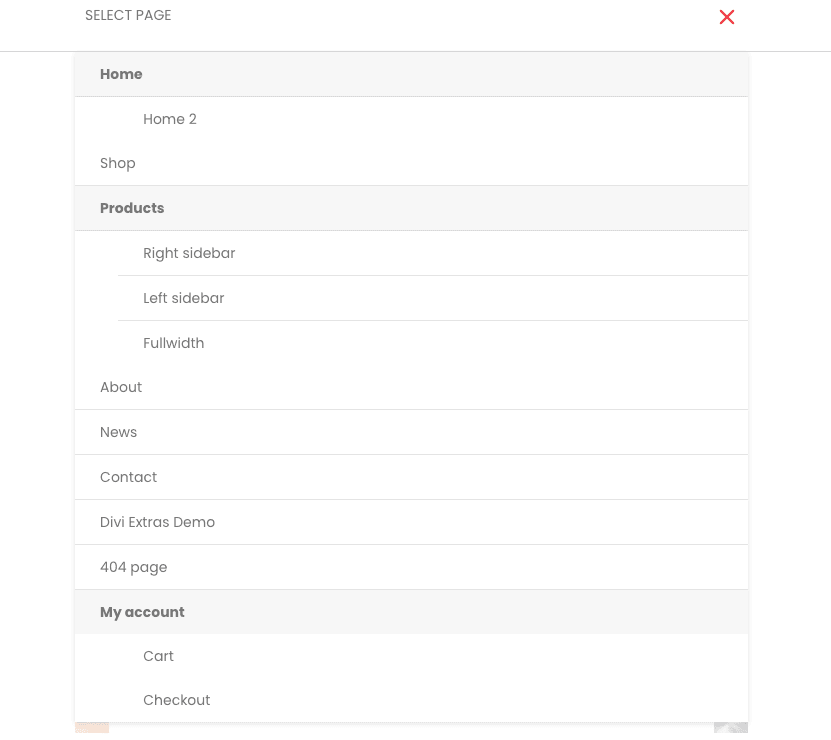
Customize the mobile menu with this easy to follow Javascript and CSS snippet! Making submenus collapse keeps the long mobile menus clean and responsive. It works with the Divi menu module and standard Divi header.
Before
After
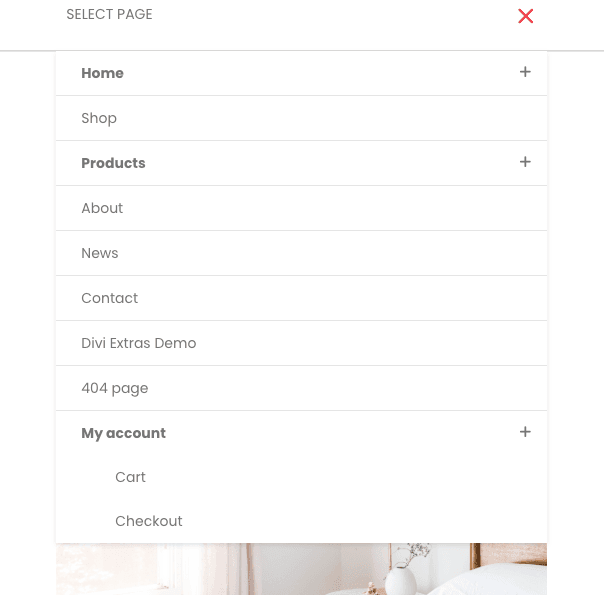
For doing this you have to just add CSS & javascript to your Divi website.
CSS
Navigate to Theme Options and scroll down to bottom and add this code to Custom CSS.
.et_pb_menu .et_mobile_menu .menu-item-has-children > a,
#main-header .et_mobile_menu .menu-item-has-children > a {
    background-color: transparent;
    position: relative;
}

.et_pb_menu .et_mobile_menu .menu-item-has-children > a:after, #main-header .et_mobile_menu .menu-item-has-children > a:after {
    font-family: 'ETmodules';
    text-align: center;
    speak: none;
    font-weight: 600;
    font-variant: normal;
    text-transform: none;
    -webkit-font-smoothing: antialiased;
    position: absolute;
    font-size: 18px;
    content: '4c';
    top: 11px;
    right: 13px;
}

.et_pb_menu .et_mobile_menu .menu-item-has-children.visible > a:after,
#main-header .et_mobile_menu .menu-item-has-children.visible > a:after {
    content: '4d';
}

.et_pb_menu .et_mobile_menu ul.sub-menu,
#main-header .et_mobile_menu ul.sub-menu,
.et-db #et-boc .et-l .et_pb_menu .et_mobile_menu li ul.sub-menu {
    display: none !important;
    visibility: hidden !important;
    transition: all 1.5s ease-in-out;
}

.et_pb_menu .et_mobile_menu li.visible > ul.sub-menu,
#main-header .et_mobile_menu li.visible > ul.sub-menu,
.et-db #et-boc .et-l #main-header .et_mobile_menu li.visible > ul.sub-menu,
.et-db #et-boc .et-l .et_pb_fullwidth_menu .et_mobile_menu li.visible > ul.sub-menu,
.et-db #et-boc .et-l .et_pb_menu .et_mobile_menu li.visible > ul.sub-menu {
    display: block !important;
    visibility: visible !important;
}
JavaScript
Navigate to Theme Options > Integration > Add code to the < body >.
<script>
jQuery(document).ready(function($){
    function ds_setup_collapsible_submenus() {
        var $menu = $('.et_mobile_menu'),
        top_level_link = '.et_mobile_menu .menu-item-has-children > a';

        $menu.find('a').each(function() {
            $(this).off('click');
            if ( $(this).is(top_level_link) ) {
                $(this).attr('href', '#');
            }

            if ( ! $(this).siblings('.sub-menu').length ) {
                $(this).on('click', function(event) {
                    $(this).parents('.mobile_nav').trigger('click');
                });
            }
            else {
                $(this).on('click', function(event) {
                    event.preventDefault();
                    $(this).parent().toggleClass('visible');
                });
            }
        });
    }
    setTimeout(function() {
        ds_setup_collapsible_submenus();
    }, 700);
 });
</script>
The Bottom Line
We hope that this method works for you. Comment down your review about this blog.
License: This snippet contains code from the Divi Theme, copyright https://elegantthemes.com.

